 Idyntic
NIN slip printing
Print NIN Slip by Demographic Details
Step-by-step guide to retrieving and printing a NIN slip using demographic details like name, gender, and date of birth when other records are missing.
Overview & Context
Demographic retrieval is the ultimate recovery solution for customers who have lost their NIN, changed phone numbers, and have zero remaining enrollment documentation.
Document & Production Details
- Matches against first name, surname, gender, and exact date of birth registered with NIMC.
- Zero search fee charged if no matching record exists in the national database.
- Provides instant resolution for complex recovery cases without requiring bank or NIMC office visits.
Step-by-Step Instructions
- 1Navigate to 'NIN by Demographic' on the Idyntic console.
- 2Input the customer's First Name, Surname, Gender, and Date of Birth.
- 3Click Search to initiate multi-parameter record matching.
- 4Review the matched profile photo, address, and recovered 11-digit NIN.
- 5Choose the desired slip layout and generate the printable PDF document.
Recommended Paper Stock
Standard 80gsm paper for proof of recovery or 250gsm card stock for full replacement cards.
Best Suited For
Senior citizens, rural residents, customers with lost SIM cards, and individuals with misplaced documentation.
Operator Tip
Ensure date of birth is entered in the exact DD/MM/YYYY format and surnames match birth or school certificates to minimize failed lookups.
Frequently Asked Questions
What if the customer has a middle name?
Enter their primary First Name and Surname first. If multiple records are found, include the middle name for precise filtering.
Is there a penalty if demographic details don't match?
No. On Idyntic, searches that return no matching records are completely free of charge.
More nin slip printing guides
View all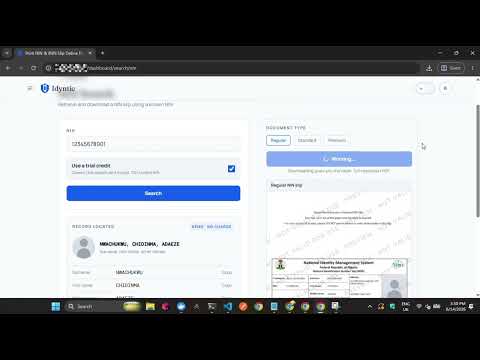 ▶0:35
▶0:35How to Print a Regular NIN Slip
Step-by-step walkthrough on generating and printing a standard Regular NIN Slip on the Idyntic platform, from entering the NIN to downloading the printable PDF.
 ▶0:40
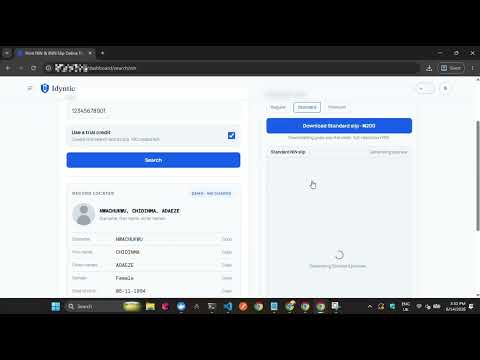
▶0:40How to Print a Standard NIN Slip
Step-by-step walkthrough on generating and printing a high-resolution Standard NIN Slip, the format most business centers use for everyday replacements.
 ▶0:32
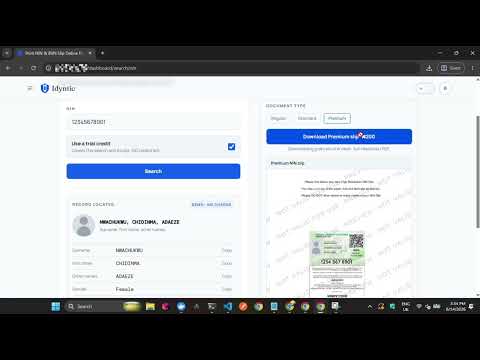
▶0:32How to Print a Premium NIN Slip
Step-by-step guide to generating and printing a high-resolution Premium NIN Slip on Idyntic, the format required for plastic PVC NIN card printing.